
WhatsApp is one of the most widely used messaging apps all over the world, especially in India. In India, there are more than 1 billion users of WhatsApp. One of the main reasons behind its success is that it is fast, widely used and really trustworthy. It also presents a bunch of special features which 90% of the users have failed to utilize. In this article, we will tell you some of the WhatsApp tricks which will help you utilize the app to its extent. So, let’s begin.
(1) Read messages without Blue Tick
Sometimes when you receive a text, you don’t want the sender to know you have read it. However, since the sender will know that you have read the message through blue ticks, you would have no choice, or would you? If you want to read the message and don’t want the other person to know about it, follow these steps:
- Go to settings
- Open account
- Go to the Privacy section
- You will find an option named Read receipts. Just turn it off.
- The end
(2) Converting videos into GIF
There are certainly some very good developers at WhatsApp. This trick will help you to convert any video into a GIF. To use this feature simply record a video, then select GIF icon on the top right corner. You can also choose the duration of the clip for your GIF. Isn’t that wonderful?
IMPT NOTE: You have to shoot the video through Whats App only.
(3) Sharing WhatsApp story to facebook
Facebook allows multi-platform sharing of Instagram stories and Whats App Status on Facebook. There are several people who first share a status on WhatsApp, then specifically on Facebook. WhatsApp provides you with an option to share your WhatsApp story on Facebook too. Once you upload a WhatsApp status, click on an option to share it on Facebook. That’s it.
(4) Starring Important Messages
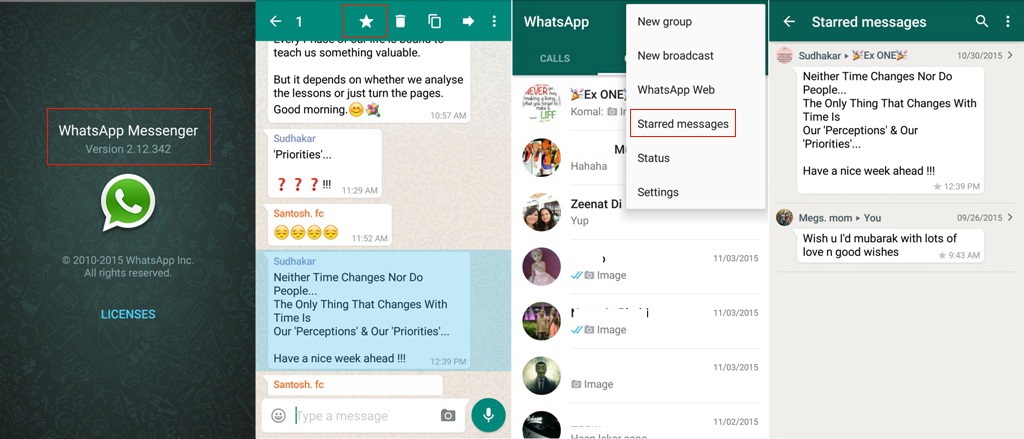
There are some important messages which you want to open anytime. However, due to the clutter of many messages, it becomes almost impossible to do so. For such purpose, WhatsApp provides an option named Starred Messages. To do this, Long Press the important message and click the star icon above. You can always check these messages under the Starred Messages Tab.
Well, these are some WhatsApp tricks which we thought would come in handy. Hope you liked it. If you did, share it with your friends.
Get Youth Related News, Movies Reviews, Technology News, News Gadgets and many more with Youth Express