If you are Digital Marketing Guy then you must be wondering “How to find the location of a particular campaign’s Link in Google Analytics?” then here you come. As such, there is innumerable stuff to learn from Google Analytics, but it is hard to find a location for a particular given link.
Here are some points to finding out the location of a particular link is given –
You must have logged into Google Analytics to get access to data.
Firstly, Go to the Acquisition Section where you can find the insight about the user.

Then, Go to Campaigns.

In the Next Step, you have to click on All campaign.

Then, Select your Campaign which you have created before.
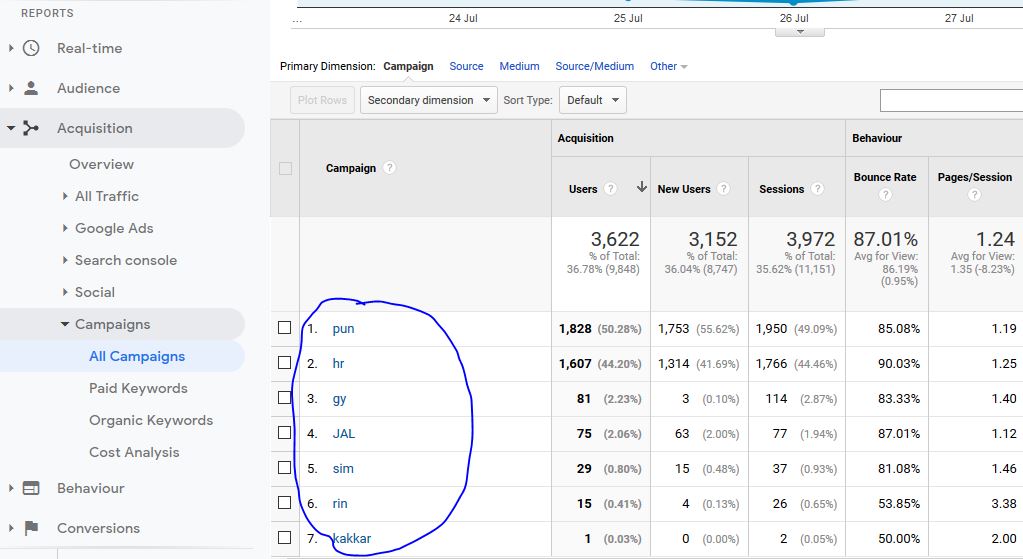
Click on your particular link.
Choose Secondary dimension which has given above the campaign list

Here You will find Behaviour, Click on Behaviour.
Then Select Users from below.
Here you’ll get the city then Choose the City Section.

Eventually, we find the location for Particular Link/Campaign. For Any Digital Marketing Query Please ask us. We will try to decode every query you asked.